


How to Build a Community on WhatsApp — and Watch It Fail

Over the past eight years, I have built 12 communities on WhatsApp. Some peaked at 50 members and others pushed past 800. We have communities for PHP Developers, Growth Marketers and even a local guitar enthusiasts.
Ironically, the most active group is also the smallest in member count. The almost dead ones are the largest in member count.
Typically, a community should become more active with its member count. However, my experience has been totally different.
In this small article, I'll tell you everything I've learned about building a community on WhatsApp. We'll also talk about the pros and cons of WhatsApp as a community platform.
If you stick to the bottom, I"ll tell you a 100x better way to build a community. Promise! 🙌
Steps to Build a Community on WhatsApp
This is fairly simple, to be honest.
A WhatsApp community is a collection of 'groups'. Here's how to launch your community in easy steps:
Open WhatsApp and tap on 'Community' tab in the bottom panel.
Tap the (+) button in the top-right corner -> tap "Get Started" button
Provide Community Name, Photo and Description.
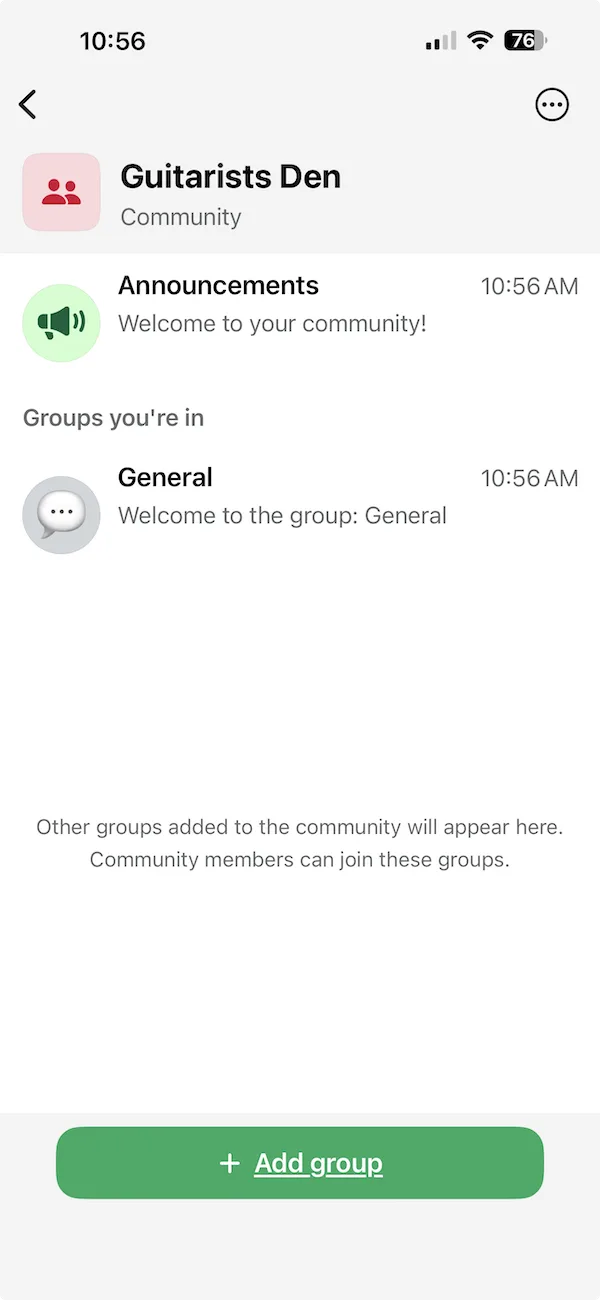
WhatsApp creates your community with a default "General" group.
Look at a sample community I've created called "Guitarists Den":
Tips on Setting Community Photo, Name and Description
Group Photo: Keep it relevant to the overall topic or theme of the community. If you are building a community of marketing professionals - then provide a photo that represents marketing. Feel free to use OpenAI or Gemini to generate an AI-powered image.
Group Name: This is very important. Avoid fancy WhatsApp group names in the beginning. You can go with "Marketing Ninjas" or simple "Digital Marketing Pros". But don't be too creative or fancy in your naming.
Your members may already have several groups and your group need not make them think twice before knowing what the group is about and why they joined.
Group Description: Keep it short and simple. Don't make false promises in the description. It's strongly advised to keep the description a direct representative of what the group offers.
Get first 20 members in your community
In any community first 20 members are the most important. They will determine how your community grows and the first-impression it creates.
Seed the content before you invite first member
Even before you invite the first members of your new WhatsApp community, it's essential to share some useful content. This is called 'content seeding'. Unfortunately most community admins ignore this stage and then wonder why their WhatsApp group isn't growing.
Invite each member personally
This step is crucial. Talk to your potential users personally before you invite them. Make them feel exclusive.
I've seen community admins simply flood other groups with invitation links. It doesn't work. Don't even waste your time doing it.
Talk to users -> be 100% convinced that they will benefit from the community -> then send them the invite link.
First 30-60 days
Depending upon the kind of community you are building and the audience, you will have to build a discipline of sharing useful, informative content.
No spam, useless posts ever. It offends your potential active users.
I recommend sharing small posts, useful resources from the Internet, videos etc. You may even do a weekly poll to keep the members interested and engaged.
Nudge the Users to Participate
Your first members aren't going to be active on the community on their own. Even if they receive a notification, they will not have enough drive to add replies or share new messages.
You may simply ask them to add a reaction.
Appreciate small contributions
If your new members perform a positive action in the community, you must appreciate them. You need not send a DM every time; but leave a reaction on their message and once every few days; type a message thanking the member. Do it naturally and genuinely.
Grow Your Community
First 30 days should give you a sense of community's growth and whether it's worth investing time and efforts. If you feel the 'vibe', you can then start onboarding new members.
This can either be done through participating in other relevant groups, inviting members personally and reminding your existing users to invite their friends.
Keep in mind that a community's value resides in two places: content and network. If you can nail one or both - your community will grow.
Should You Use WhatsApp to Build a Community?
I promised you that I'll tell you a 100x better way to build a community. Let me tell you, I don't recommend building a community on WhatsApp.
Drawbacks Vs. Advantages of WhatsApp as a Community Platform
I love WhatsApp. It's a great platform to build small groups of your family, friends and colleagues. However, after years of building communities on WhatsApp; it's not my top choice to build a serious community.
The drawbacks of WhatsApp as a community platform outweigh its advantages. Listen to me:
WhatsApp is great as a chat tool:
Getting new users. Your members already have the app installed. So they can join quickly.
WhatsApp is easy to use. Your members already know how to reply to messages add reactions etc.
WhatsApp sends push notifications; and that keeps your community on the top of their minds.
WhatsApp is a terrible community platform:
Your content is hidden from the Internet. Google, ChatGPT, LLMs can't find the useful content created inside your community. You miss out natural organic growth via organic traffic.
It doesn't preserve knowledge. Great communities create knowledge over time; and it's searchable.
It's 'chat-first'. Imagine this - you typed a very useful post or shared an awesome resource. Then a few members added some other low-value posts. Your useful content is now lost forever. People aren't going to scroll all the way up to find it. New members who join the community will never know how amazing your post was.
Its chaotic. A community should become more active as new members join. WhatsApp does the opposite. Almost all of our communities grew super active as we grew to 20 active members. But after that, it became impossible to keep track of the chats. You can't read 50+ posts daily. You can't come back to them later on. You can't bookmark them.
No moderation: WhatsApp doesn't offer good moderation tools. You either have to send a DM personally to the troublemaker - or ban them. For content, you can delete posts. But that's all. There's not much you can do.
No privacy: Many members of our group were not comfortable sharing their phone numbers with strangers. WhatsApp doesn't do anything about it - because it's not meant to be a community platform.
It's worth remembering that WhatsApp was not meant to be a community platform. It was meant to be a messenger that allowed group chats. It does a fantastic job as a chat tool. But as a community platform - it fails.
So - Where Should I Host My Community?
Your choice of community platform must be decided by the type of community you want to build and your audience.
If you are building a small community of 20-50 people; build it on WhatsApp (or Telegram). It doesn't matter. Keep in mind that your community will miss out on compounding growth through organic traffic. If that's not your concern; don't look beyond.
Serious Communities: If you are building a serious community that wants to grow organically to hundreds and thousands of users - you need to be an an open platform.
There are several choices. Jatra Community Platform - Best for SEO, Discourse, XenForo, Flarum - I can name many. These platforms will let you create a community in organized way and make sure that your content brings compounding growth.
The choice of community platform is difficult one. If you want help; feel free to comment below or start a new discussion. I'll be happy to help.