

New Feature: Native Events for Jatra Communities

Jatra now includes a dedicated Event post type for organizing community events. Events work like other Jatra posts while providing event-specific publishing, RSVP, calendar, attendee and SEO functionality.
Event Show Page:
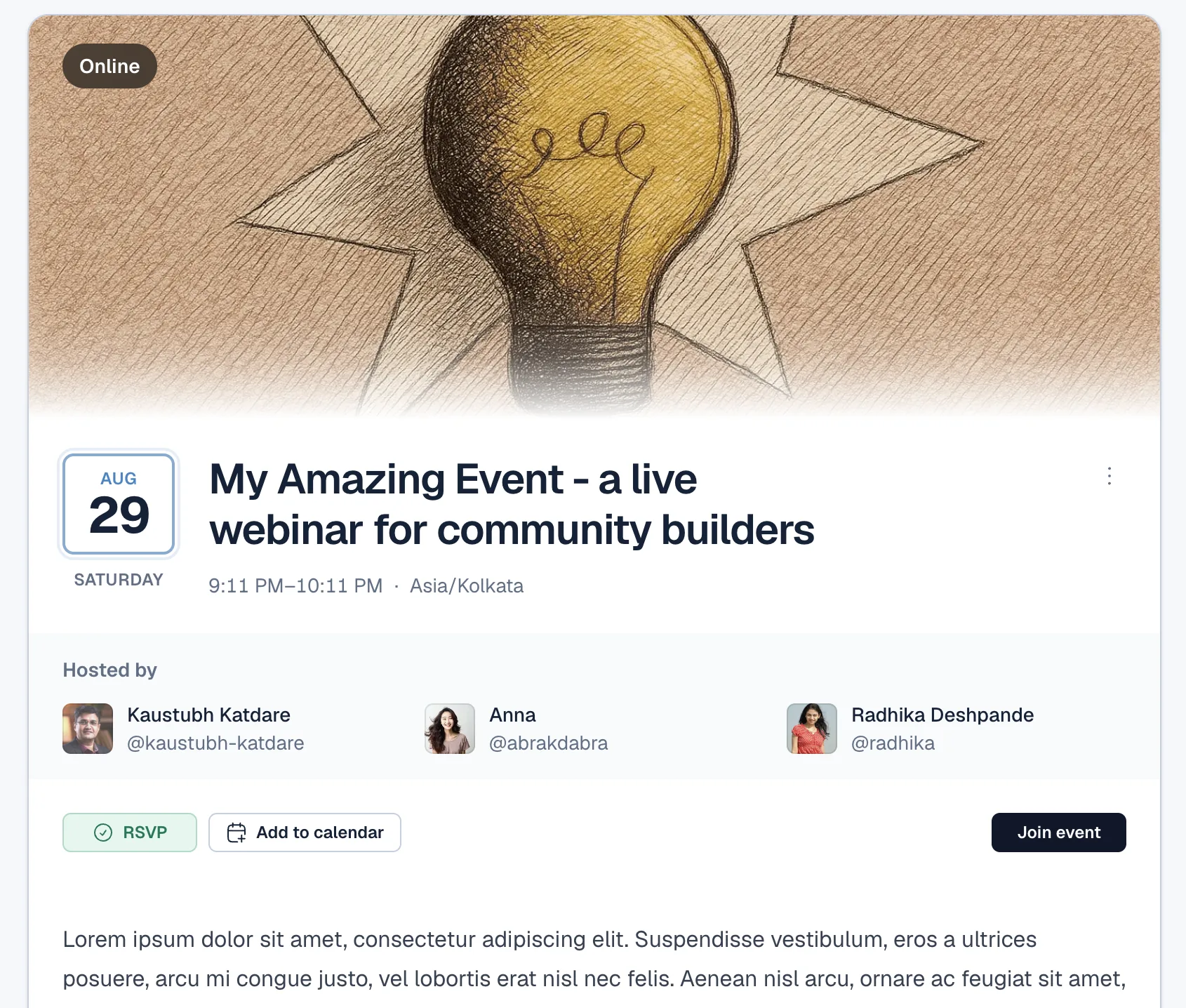
Creating an event
Event creators can configure:
Event title and rich-text description.
Optional full-width cover image.
Start and end date and time.
A friendly timezone selector.
Online or in-person format.
A protected joining URL for online events.
Between one and three hosts.
Attendee-list visibility, enabled by default.
All hosts must be existing members of the community. The post creator can select someone else as the primary displayed host, making it possible for administrators to create events on behalf of other members.
Event discovery and presentation
Events receive purpose-built cards in the community feed with:
A compact highlighted date panel.
Event title, timezone and format.
Host names and avatars.
RSVP controls.
Attendee avatar previews and count.
Event cards use the same responsive dimensions, typography, hover treatment and click behaviour as other Jatra post types.
Each event also has a dedicated responsive page containing the cover image, schedule, hosts, RSVP actions, description and attendee preview. Events without a cover image receive a neutral fallback gradient; uploaded images remain unchanged.
RSVPs and attendees
Only signed-in community members can RSVP.
Guest registrations are not supported.
Event hosts are automatically added as attendees.
Hosts cannot withdraw while they remain assigned as hosts.
Regular attendees can toggle their RSVP.
Members are informed that their display name and email address will be shared with the hosts.
Attendee lists are loaded with server-side pagination.
The full attendee list can be expanded within the event page.
Public attendee lists never reveal email addresses.
Disabling the attendee list hides attendee identities and the public count.
Calendar and joining access
Members who RSVP can download a standards-based .ics calendar file using Add to Calendar.
The calendar file includes the event schedule, timezone and canonical event URL. It does not send an invitation or create notification emails.
Joining links are protected and are not exposed publicly. They are available only to eligible attendees and authorized event staff while the event is upcoming or in progress. Join Event and Add to Calendar actions disappear after an event ends or is cancelled.
Host tools
Hosts and authorised community staff can export the active RSVP list as CSV. The export contains:
Member display name.
Member email address.
The CSV remains available after cancellation so hosts can retain access to the existing attendee information.
Event status and permissions
Events support four states:
Upcoming.
In progress.
Event ended.
Event cancelled.
Ended and cancelled events remain visible in the feed as part of the community’s history.
Event creators retain the normal permissions associated with Jatra posts. Event creators, community owners, administrators and moderators can cancel an event. Assigning someone as a host does not grant general editing or deletion privileges; hosts receive attendee-export access only.
Privacy and SEO
Events follow existing channel permissions. An event in a private or restricted channel remains unavailable to unauthorized visitors and search engines.
Accessible event pages include:
Canonical metadata.
Minimal Schema.org - Schema.org
EventJSON-LD.Event name, description, schedule, timezone, format, status and image data where available.
Search-friendly event URLs and page structure.
Availability
Events are available for all existing communities when creating a new channel. New communities have Events enabled by default.
Community owners can enable the feature by going to channel settings and creating a channel with Event selected as its post type.
Not included in V1
This initial release does not include paid tickets, guest registrations, capacity limits, waitlists, custom signup forms, invitation emails, automated reminders, maps or advanced attendee management.
These can be considered in future versions based on community feedback.