
Changelog: Version 3.0.0

Jatra 3.0 :: XML Sitemap Relocated + Smart URL Inclusions (Action Required)

Kaustubh Katdare

Kaustubh Katdare

@kaustubh-katdare Feb 21, 2026
breaking change action required

Jatra 3.0 introduces an important SEO update: the XML sitemap location has changed.

If your community is on Jatra, you should remove the old sitemap URL from your webmaster tools and submit the new one:

sitemap.xml

Example:
https://yourcommunitydomain.com/sitemap.xml

What is an XML sitemap?

An XML sitemap is a machine-readable document for search engine crawlers.
It helps Google, Bing, and other search engines quickly discover your key pages and crawl updates more efficiently.

What changed in Jatra 3.0?

  • Sitemap is now served from the community root path: sitemap.xml

  • Sitemap generation is now smarter and more selective

  • URL inclusion rules are stricter to improve crawl quality and index hygiene

Smart URL inclusion policy (new)

Jatra now includes only URLs that should be discoverable and rankable.

  • Includes published, canonical content URLs

  • Excludes drafts, scheduled, and archived content

  • Excludes expired Jobs from sitemap output

  • Generates News sitemap entries only for recent/valid news content

  • Prevents inactive communities from being indexed through sitemap output

This means cleaner indexing and less crawl waste for your domain.👍

Why this is a breaking change

Search engines will continue checking the previously submitted sitemap URL unless you update it.

If the old path remains in Search Console, discovery speed for new/updated content may degrade.

What customers should do now

  1. Open Google Search Console (and Bing Webmaster Tools if used).

  2. Remove the old sitemap entry.

  3. Submit: https://yourdomain.com/sitemap.xml

Final note

This change is designed to improve long-term SEO health across Jatra communities by prioritising high-quality, indexable URLs only.


Replies

Welcome, guest

Join Jatra Community to reply, ask questions, and participate in conversations.

Jatra Community powered by Jatra Community Platform

  • Kaustubh Katdare

    Kaustubh Katdare

    @kaustubh-katdare Feb 20, 2026

    Update [Couldn't Fetch Error in Google Search Console]

    Google Search Console may report "Couldn't Fetch" for a while after submitting the sitemap. Give it 24 hours and check again. Google often re-crawls the sitemap before recognizing it. This does NOT affect your SEO or indexing in any way.

    Keep in mind that there is NO guarantee that sitemaps submitted through sitemaps are indexed or ranked. Search engines may include or exclude any URL based on its overall quality and usefulness. As a webmaster - you have no control over it.

    If the URL of your choice is not indexed / ranked by Google, simply resubmit the URL through Google Search Console.

  • Kaustubh Katdare

    Kaustubh Katdare

    @kaustubh-katdare Feb 20, 2026

    Sitemap Structuring

    Jatra hosts communities of different sizes. Some of our communities have just a few hundred posts, while others have hundreds of thousands of posts.

    Jatra's Sitemap System builds sitemap index on sitemap.xml and it includes links to child sitemaps. This structure can scale up while following Google's guidelines.

    Here's how sitemaps are structured:

    • sitemap.xml - is the index file (entry point for search engines).

    • It points to one or more child files: sitemap_0001.xml, sitemap_0002.xml and so on.

    • URLs are automatically chunked into these child files (max URLs per file) so even, large communities stay sitemap-compliant.

    • Each sitemap rebuild is automatic. Jatra generates a fresh set first, then switches it live in one step to avoid partial or broken sitemap reads.

    • Only public, indexable URLs are included in standard machine-readable datetime format (UTC).

    Jatra's sitemaps follow the official Sitemaps.org XML protocol.

    Note: For communities that use 'News' post type, we create 'news-sitemap.xml'. It should be submitted separately in the Search Console.

  • Paula Derrenger

    Paula Derrenger

    @paulad Feb 20, 2026

    I’ve requested an update to the sitemap location. My team will update it shortly. I can see the child sitemaps. Should we submit them individually?

  • Kaustubh Katdare

    Kaustubh Katdare

    @kaustubh-katdare Feb 20, 2026

    Hi @paulad - welcome back. Only submit sitemap.xml in Google Search Console. Google will crawl the index sitemap and automatically list the child sitemaps.

    GSC may show error in the first 24 hours, however, there's nothing to worry about. Do let me know if the sitemap continues to show sitemap errors after 24 hours of submission.

  • ShubhadaJP

    ShubhadaJP

    @BlockChainMentor Feb 21, 2026

    Hi @kaustubh-katdare — quick check on two things:

    1. It’s been 24 hours and the updated sitemap still isn’t showing as refreshed in GSC.

    2. Since the recent changes, Google Analytics has stopped fetching data as well.

    Do we need to take any manual steps from our side, or should Analytics start tracking again automatically once GSC picks up the updated sitemap?

  • Kaustubh Katdare

    Kaustubh Katdare

    @kaustubh-katdare Feb 21, 2026

    @BlockChainMentor -

    1. Sitemap: No extra step is required. Google seems to be taking longer. It's updated the sitemap for some of demo communities already. It's matter of time. You may remove the sitemap and add it again - although it is not required. You may validate your sitemap once on https://www.xml-sitemaps.com/validate-xml-sitemap.html . If it's valid - nothing to worry. Give it more time. Be assured that this does NOT affect your web-crawl, indexing or ranking in any way. Sitemap is just a signal to Google.

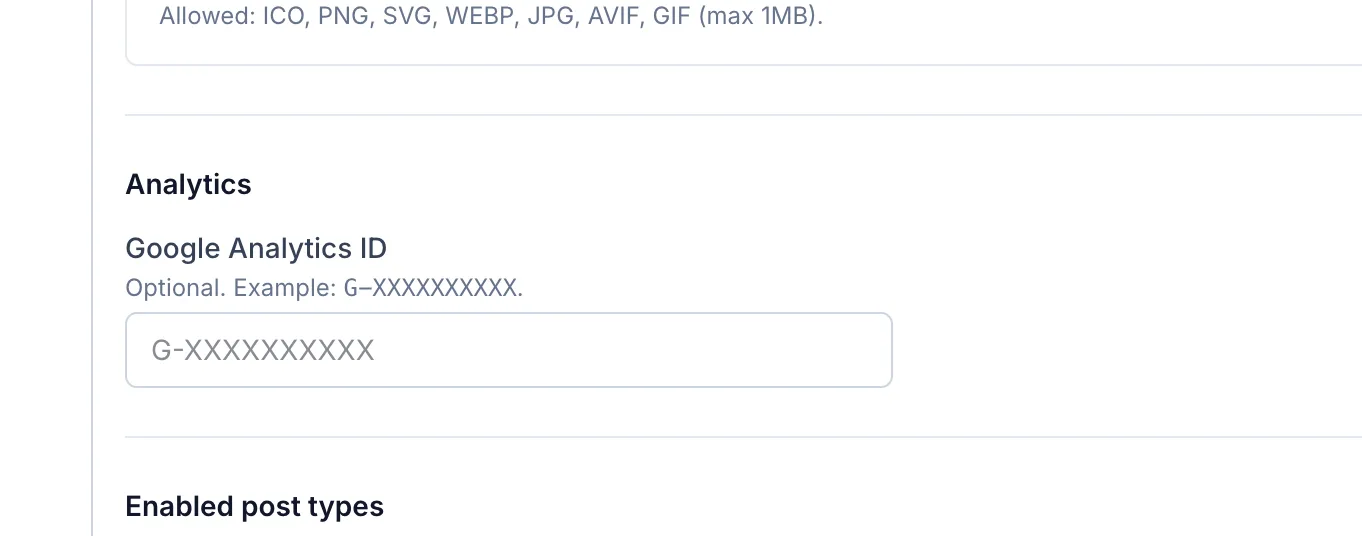
    2. For Google Analytics - please check if you have added the Google Tracking ID in Community Settings. Check the screenshot below.

    Jatra Settings: Google Analytics ID